> For the complete documentation index, see [llms.txt](https://docs.phoenixlidar.com/llms.txt). Markdown versions of documentation pages are available by appending `.md` to page URLs; this page is available as [Markdown](https://docs.phoenixlidar.com/hardware-and-interfaces/camera/a6k-lite-camera/ports-and-user-elements.md).
# Ports and User Elements
Page explaining the camera ports and user elements.
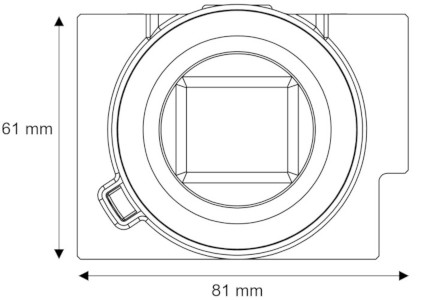
Camera shown without attached lens.
## FRONT
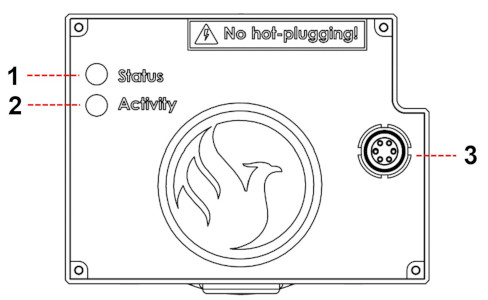
## BACK
(1) [Status LED](/hardware-and-interfaces/camera/a6k-lite-camera/status-and-activity-led.md)
(2) [Activity LED](/hardware-and-interfaces/camera/a6k-lite-camera/status-and-activity-led.md)
(3) LEMO Input Connector (connects to NavBox)
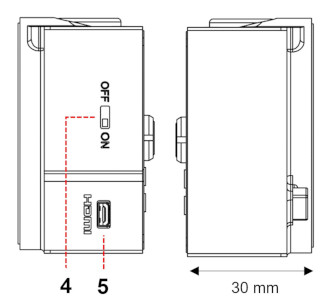
## SIDES
(4) ON/OFF Switch (Only used to save settings after changes were made. See [Changing Camera Settings](/hardware-and-interfaces/camera/a6k-lite-camera/changing-camera-settings.md))
(5) Micro HDMI Connector
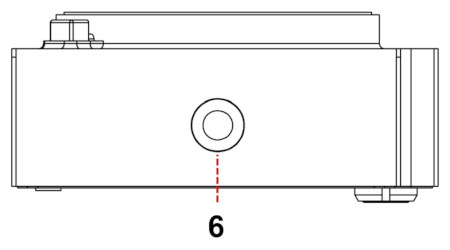
## BOTTOM
(6) 1/4"-20 [Mounting ](/hardware-and-interfaces/camera/a6k-lite-camera/mounting.md)Thread
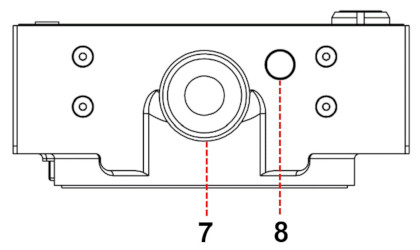
## TOP
(7) [Settings Wheel](/hardware-and-interfaces/camera/a6k-lite-camera/settings-wheel.md)
(8) MENU Button