> For the complete documentation index, see [llms.txt](https://docs.phoenixlidar.com/llms.txt). Markdown versions of documentation pages are available by appending `.md` to page URLs; this page is available as [Markdown](https://docs.phoenixlidar.com/spatialexplorer-8-and-9/user-interface/toolbars/analytics/classify/classify-ground.md).
# Classify Ground
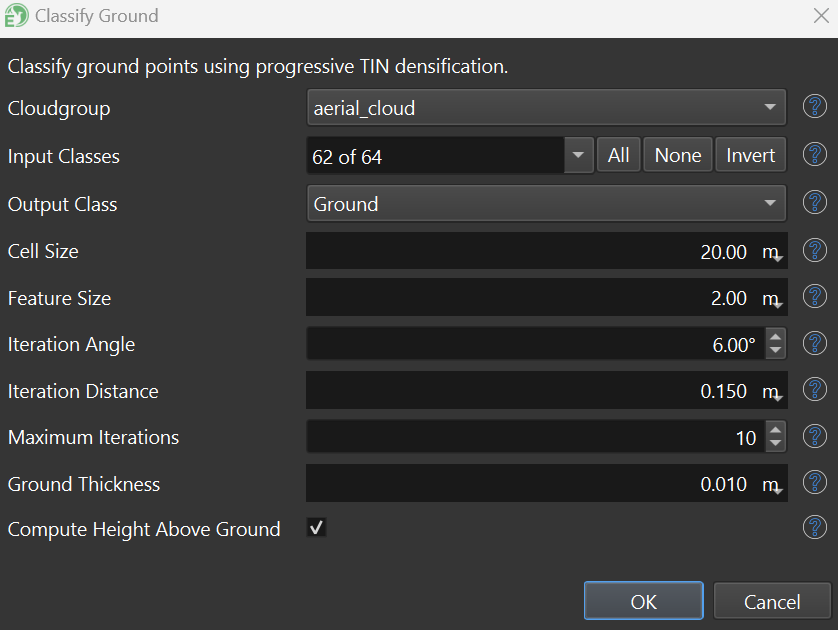
**Classify Ground** classifies ground returns using a progressive TIN densification algorithm. Low points in a region are used to create TIN meshes that represent the ground surface. Additional points can be added to the ground class if they do not exceed either the **Iteration Angle** or **Iteration Distance**, measured in respect to the current ground mesh.
{% hint style="warning" %}
Low points are used to create ground meshes, so any low noise (i.e. lidar noise below the true ground surface) must be classified accordingly prior to running the Classify Ground filter. See [**Classify Noise**](/spatialexplorer-8-and-9/user-interface/toolbars/analytics/classify/classify-noise.md) for more information on classifying low point noise.
{% endhint %}
**Cloudgroup**
Cloudgroup to process.
**Input Classes**
Classes to process when searching for ground points.
**Output Class**
Output class for ground points.
**Cell Size**
Initial sampling stride for low points. This parameter is typically used for large building removal. Set this parameter greater than the size of your largest building, to ensure that roof points are not included in the initial ground mesh.
**Feature Size**
Low point sampling stride. Decrease to search at a higher resolution to classify smaller ground features (climb up small berms or quick changes in elevation). Increase it if the ground classifier over classifies (boulders/vegetation).
**Iteration Angle**
For a point to be included in the ground class, the angle between it and the current ground mesh must be smaller than this specified angle.
**Iteration Distance**
For a point to be included in the ground class, the distance between it and the current ground mesh must be smaller than this specified distance.
Iteration Distance and Iteration Angle visualized.
**Maximum Iterations**
More iterations will result in a higher frequency mesh which may represent the true ground more accurately. When terrain variation is limited, decreasing iteration count slightly (e.g. 4 or 5) will improve runtime performance.
**Ground Thickness**
Points within this distance from the final iteration ground surface mesh are classified as ground. To capture all ground returns, set this parameter to your dataset's hard surface precision. The default value of 1 cm works well for capturing points that represent the ground surface mesh.
.png?alt=media&token=f857b35c-8fe0-4d2f-92d7-c7c82d66204c)