> For the complete documentation index, see [llms.txt](https://docs.phoenixlidar.com/llms.txt). Markdown versions of documentation pages are available by appending `.md` to page URLs; this page is available as [Markdown](https://docs.phoenixlidar.com/spatialexplorer-8-and-9/user-interface/toolbars/workflow/create-cloud.md).
# Create Cloud
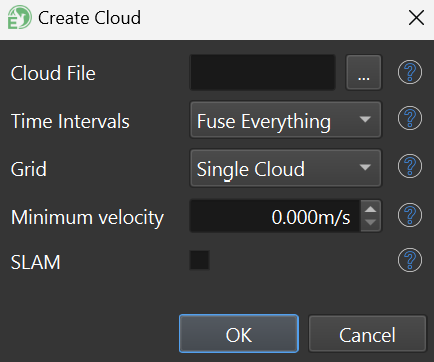
Point clouds can be produced using the Create Cloud tool.
**Time Intervals**: It's especially common with aerial-acquired data to fuse only select [processing intervals](/spatialexplorer-8-and-9/user-interface/windows/project/intervals.md), rather than to fuse all data.
**Grid**: Fusing to a grid enables the user to create a [cloud group](/spatialexplorer-8-and-9/user-interface/windows/project/pointclouds.md#cloud-groups) (i.e. a tiled point cloud). This is advantageous with spatially large data sets.
{% hint style="info" %}
A **Minimum Velocity** of 0.1 m/s can be useful when fusing mobile data sets. This prevents data accumulating when the vehicle is not in motion.
{% endhint %}
**SLAM:** SLAM processing can be enabled here for multi-laser lidar systems. If SLAM is enabled, an additional [SLAM Processing settings ](/spatialexplorer-8-and-9/user-interface/windows/slam/slam-processing-profile.md)menu will appear.